
micromamba 工作环境配置
528 字
3 分钟
micromamba 工作环境配置
之前用的 miniconda,近期看到了 mamba 这个项目,看了下官网,有个 micromamba 的基于 C++ 开发的,性能会更好一些。
micromambais a fully statically-linked, self-contained, executable. This means that thebaseenvironment is completely empty. The configuration formicromambais slightly different, namely all environments and cache will be created by default under theMAMBA_ROOT_PREFIXenvironment variable. There is also no pre-configured.condarc/.mambarcshipped with micromamba (they are however still read if present).
micromamba 的特点:
- 使用多线程下载 repository data 和 packages(最新的 conda 也支持多线程了);
- mamba 使用 libsolv 加速解决依赖关系;
- mamba 的核心部分通过 C++ 实现,以获得最大执行效率;
- mamba 可与 conda 完美兼容;
homebrew 方式安装
brew install micormambalinux 安装
"${SHELL}" <(curl -L micro.mamba.pm/install.sh)初始化配置
mkdir -p ~/micromamba
# 与 zsh 集成micromamba shell init -s zsh -p ~/micromamba
source ~/.zshrc配置清华源
cat >> ~/.condarc << EOFchannels: - defaultsshow_channel_urls: truedefault_channels: - https://mirrors.tuna.tsinghua.edu.cn/anaconda/pkgs/main - https://mirrors.tuna.tsinghua.edu.cn/anaconda/pkgs/r - https://mirrors.tuna.tsinghua.edu.cn/anaconda/pkgs/msys2custom_channels: conda-forge: https://mirrors.tuna.tsinghua.edu.cn/anaconda/cloud msys2: https://mirrors.tuna.tsinghua.edu.cn/anaconda/cloud bioconda: https://mirrors.tuna.tsinghua.edu.cn/anaconda/cloud menpo: https://mirrors.tuna.tsinghua.edu.cn/anaconda/cloud pytorch: https://mirrors.tuna.tsinghua.edu.cn/anaconda/cloud pytorch-lts: https://mirrors.tuna.tsinghua.edu.cn/anaconda/cloud simpleitk: https://mirrors.tuna.tsinghua.edu.cn/anaconda/cloud deepmodeling: https://mirrors.tuna.tsinghua.edu.cn/anaconda/cloud/EOF
# 清除索引缓存micromamba clean -i
# 和conda不一样,使用 micromamba 必须手动设置channelsmicromamba config prepend channels conda-forgemicromamba 可以识别 conda 的配置文件 micromamba 的配置优先级为 API >> CLI >> ENV >> RC 多个 RC 配置文件的读取顺序如下,越晚读到的配置优先级越高
使用 micromamba
操作命令示例
Terminal window
# 创建新环境# 激活环境# 取消激活环境micromamba deactivate# 删除环境安装 pandas 测试
micromamba install pandas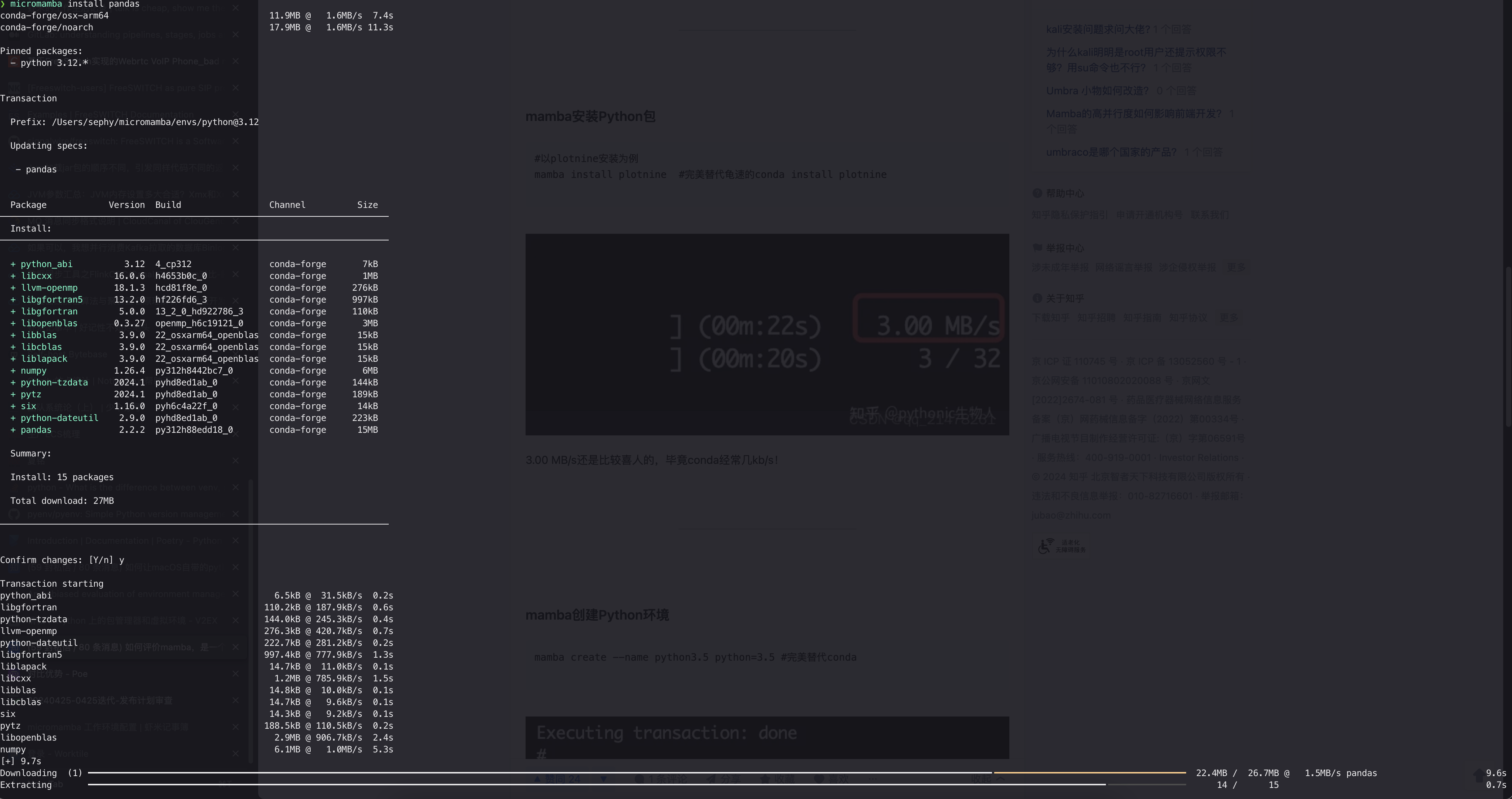
vscode集成配置
在安装的时候,如果没有修改默认的设置,则mamba的路径应该在~/micromamba
打开VSCode的设置,添加下面的设置:
python.venvFolders这一项,添加mamba的目录名,即micromamba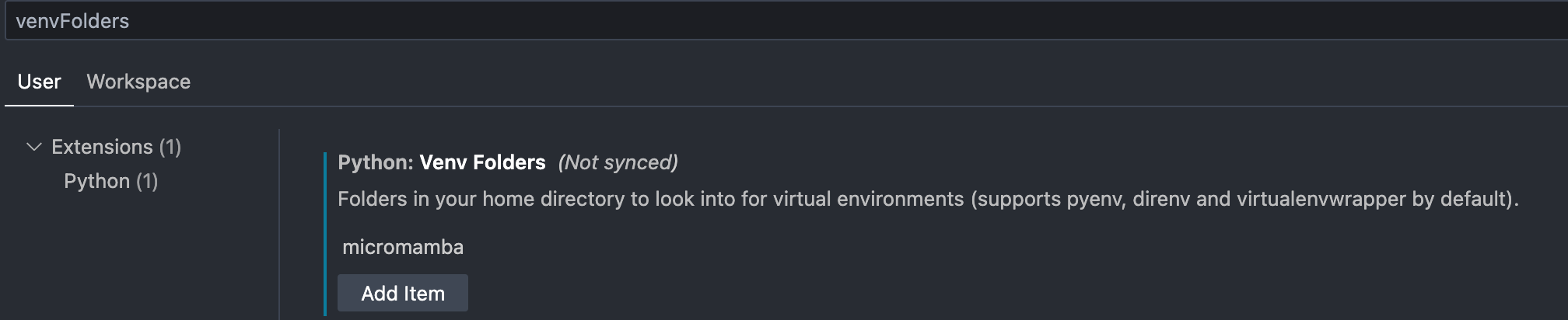
image 47 python.venvPath这一项,添加mamba虚拟环境的目录,即~/micromamba/envs
image 48 Python:select interceptor选择指定解释器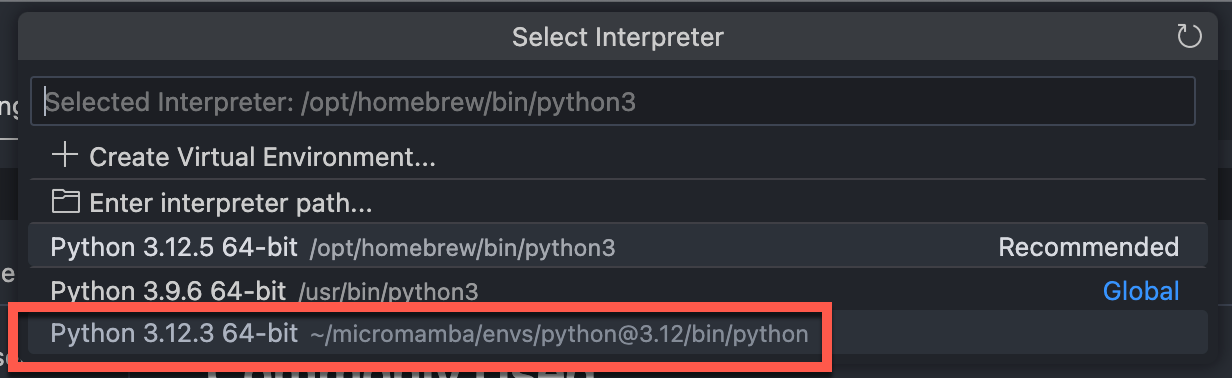
image 49
📎 参考文章
文章分享
如果这篇文章对你有帮助,欢迎分享给更多人!
micromamba 工作环境配置
https://blog.sephy.top/posts/micromamba-environment-configuration/相关文章智能推荐
1
UV 使用
编程UV 统计方案与实现。包含 UV 定义、去重方案、Redis 实现、精度与性能权衡等。
2
重新认识 .gitignore:目录级规则与 .git/info/exclude
编程从目录级 .gitignore 的作用域、匹配优先级和常见陷阱出发,理解 Git 的忽略机制,并掌握 .git/info/exclude 的使用方法。
3
从 cc-connect 看 Codex CLI 的交互模式:stdin、stdio 与 HTTP
AI以 cc-connect 调用 Codex CLI 为例,拆解 exec、app-server、stdin/stdout 和 JSON-RPC,再和 HTTP 的通信模型做对照。
4
把 MCPHub 部署在 Homelab 上:统一管理 MCP 服务的实际体验
AI记录我把 Linear、Cloudflare、Bytebase 等 MCP 服务集中部署到 Homelab 后,解决多设备重复配置、token 分散和 MCP 地址过多问题的实际体验。
5
企业为什么需要 MCPHub:从统一接入到工具治理
企业AI从 MCP 服务集中接入、凭据治理、分组授权、监控审计和运维边界出发,讨论 MCPHub 在企业 AI 工具治理中的实际价值与局限。
随机文章随机推荐