


Nginx CORS 配置
616 字
3 分钟
Nginx CORS 配置
浏览器同源策略
浏览器安全的基石是”同源策略”(same-origin policy). “同源”指的是”三个相同”:
- 协议相同
- 域名相同
- 端口相同
如果非同源,共有三种行为受到限制。
Cookie、LocalStorage、IndexDB无法读取DOM无法获得AJAX请求不能发送
CORS原理解析
CORS是跨源AJAX请求的根本解决方法. JSONP只能发GET请求, 但是CORS允许任何类型的请求.
整个CORS通信过程都是浏览器自动完成的, 不需要用户参与. 对于开发者来说, CORS通信与同源的AJAX通信没有差别, 代码完全一样. 浏览器一旦发现AJAX请求跨源,就会自动添加一些附加的头信息,有时还会多一次附加的请求,但用户不会有感觉。因此,实现CORS通信的关键是**服务器. **只要服务器支持 CORS, 就可以跨源通信.
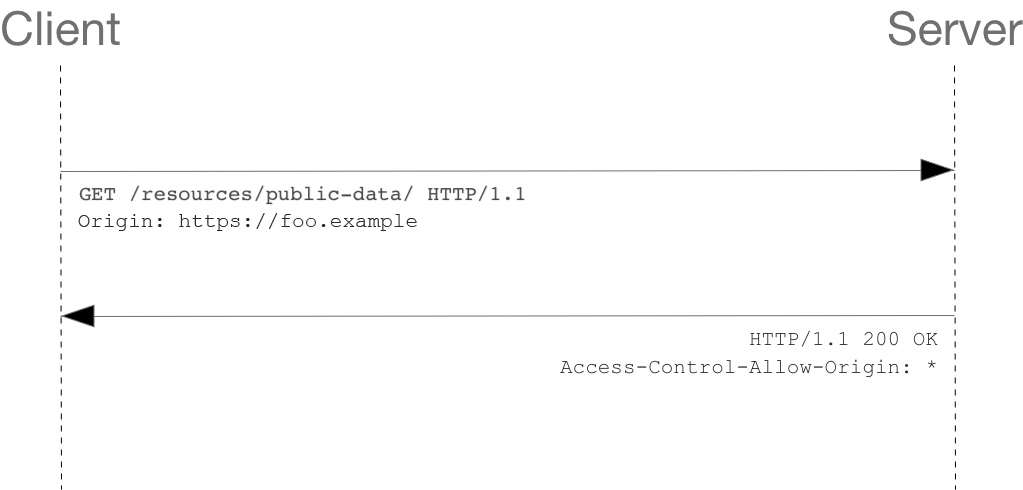
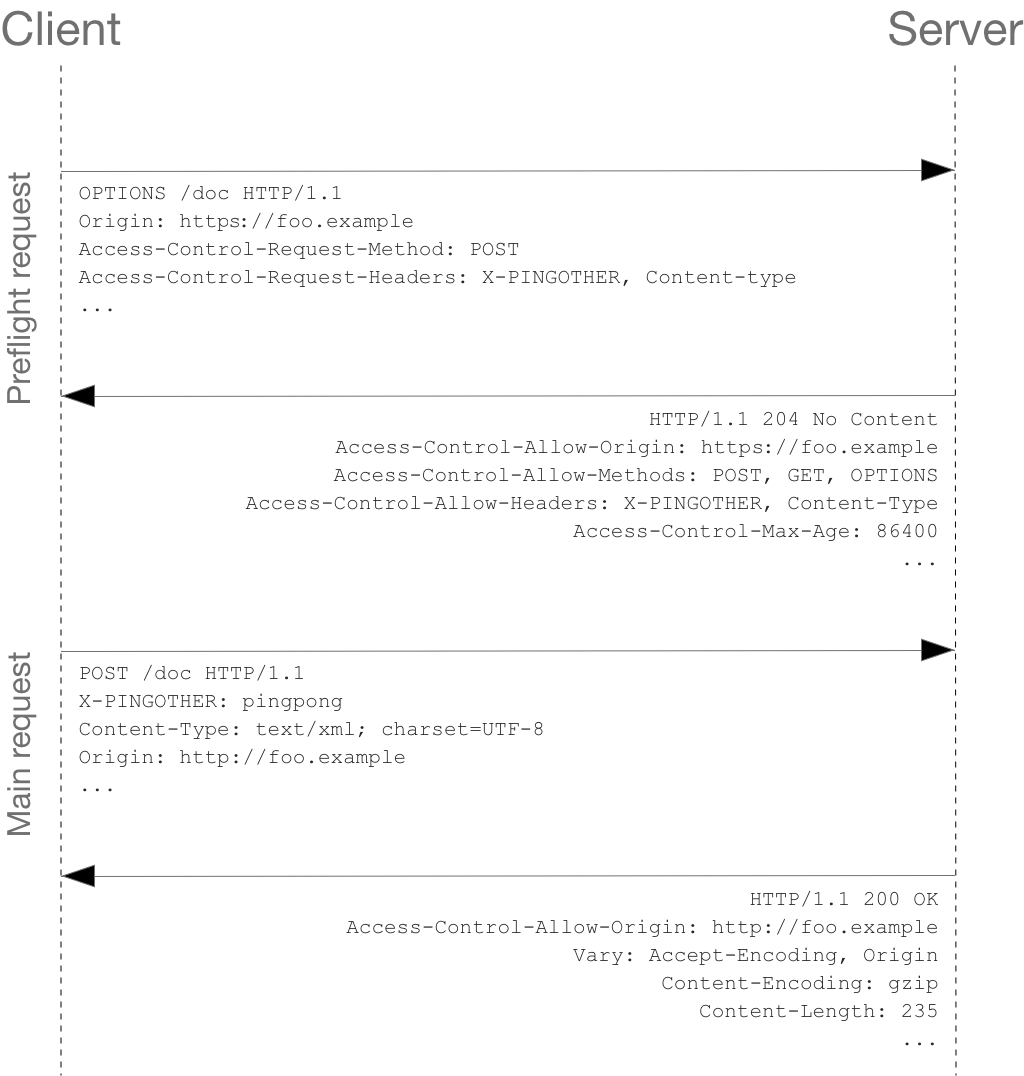
简单请求和非简单请求
直接在请求时加上 Origin 的 header
发出请求前, 会发起一次 OPTION 请求
Nginx CORS 配置
add_header不是所有返回都会追加,只限特定状态码的返回才有效,如果想所有返回都生效需要加上always选项参数
官方的解释
Syntax: add_header name value [always];Default: —Context: http, server, location, if in location# 配置示例location /path { proxy_pass target; add_header 'Access-Control-Allow-Origin' $http_origin always; add_header 'Access-Control-Request-Method' 'GET,POST,OPTIONS,DELETE,PUT' always; add_header 'Access-Control-Allow-Credentials' 'true' always; add_header 'Access-Control-Allow-Headers' 'DNT,User-Agent,X-Requested-With,If-Modified-Since,Cache-Control,Content-Type,Range' always;}CORS 响应头说明
| header | 是否必填 | 说明 |
|---|---|---|
Access-Control-Allow-Origin | Y | Access-Control-Allow-Origin 它的值要么是请求时Origin字段的值,要么是一个*,表示接受任意域名的请求, 不推荐* |
Access-Control-Allow-Credentials | N | The Access-Control-Allow-Credentials header indicates whether or not the response to the request can be exposed when the credentials flag is true. |
Access-Control-Expose-Headers | N | The Access-Control-Expose-Headers header adds the specified headers to the allowlist that JavaScript (such as Response.headers) in browsers is allowed to access. |
Access-Control-Allow-Headers | Y | The Access-Control-Allow-Methods header specifies the method or methods allowed when accessing the resource. This is used in response to a preflight request. |
Access-Control-Allow-Methods | Y | The Access-Control-Allow-Methods header specifies the method or methods allowed when accessing the resource. This is used in response to a preflight request. |
Access-Control-Max-Age | N | The Access-Control-Max-Age header indicates how long the results of a preflight request can be cached. |
CORS 请求头说明
| header | 说明 |
|---|---|
Origin | The Origin header indicates the origin of the cross-origin access request or preflight request. |
Access-Control-Request-Method | The Access-Control-Request-Method is used when issuing a preflight request to let the server know what HTTP method will be used when the actual request is made. |
Access-Control-Request-Headers | The Access-Control-Request-Headers header is used when issuing a preflight request to let the server know what HTTP headers will be used when the actual request is made (for example, by passing them as the headers option to the Request() constructor). This browser-side header will be answered by the complementary server-side header of Access-Control-Allow-Headers. |
📎 参考文章
文章分享
如果这篇文章对你有帮助,欢迎分享给更多人!
相关文章智能推荐
1
在 PVE 上给软路由虚拟机加一个网络 Watchdog
技术分享在 PVE 宿主机上用 Bash 和 systemd timer 实现一个网络 watchdog:先检测公网连通性,连续失败后重启软路由虚拟机,多次自愈无效再升级为重启 PVE 宿主机。
2
命令行自动登录 JumpServer:SSH、TOTP 与密码提示的自动化
技术分享把 JumpServer 登录流程拆成凭据读取和终端交互两层:zsh 从密码管理器安全读取 TOTP seed 与可选密码,expect 只负责响应 SSH 登录过程中的 password 和 Code 提示。
3
git 个人开发工作流
技术分享介绍个人 Git 分支协作流程:以基线分支(如 feature-a)+ 个人开发分支(feature-a-xxx)进行开发,开发分支定期 rebase 同步上游,最终通过 merge(必要时先 squash 整理提交)合回基线;并提供 grebase/gmergebase 等脚本,支持自动推导基线分支、预览计划、带 autostash 的安全 rebase,以及可选 squash/推送/删除分支的安全 merge-back。
4
使用 docker-atrust 连入深信服
技术分享使用 Docker 容器运行深信服 aTrust 客户端,通过 VNC 完成登录,并结合本机 mihomo 配置实现公司内网的 DNS 解析与按域名、IP 的精确代理分流;宿主机暴露 1080 与 8888 端口供 socks5 和 HTTP 代理使用,从而在不安装原生客户端的情况下实现零信任接入并降低对本机的影响。
5
mihomo 使用
技术分享2025-09-30
随机文章随机推荐
文章
61
分类
4
标签
52
总字数
64,663
运行时长
0 天
最后活动
0 天前
站点域名blog.sephy.top
Fireflyv6.13.9
Astrov7.0.7
Nodev22.23.1
pnpmv9.14.4
构建时间2026年7月15日 00:54:40
系统信息Linux / x86_64